Unleash Maximum Bandwidth.
Engineered for Speed & Resilience.

A high-performance, open-source download accelerator built with Electron, React, and modern web standards. Featuring 2 to 32 parallel HTTP Range streams, native BitTorrent & Magnet link swarm acceleration, automated category sorting, range resume recovery, and instant browser extension capture for Linux, SteamOS, and Windows.

BitTorrent & Magnet Swarms Linux AppImage & Installer Steam Deck & SteamOS Chromium Browser Extension
10x
Max Speed Acceleration
32
Concurrent Streams per File
100%
Range Resume Recovery
0 ms
Localhost Bridge Overhead

See the Range Streaming Engine in Action

Experience the live telemetry, dynamic segmented chunk matrix, and speed gauges exactly as they render inside the desktop app.

Icon Voltrex Loader v1.3.0
DOWNLOADING
48.6 MB/s Aggregate Transfer Rate
Concurrency: 3 tasks 16 Threads
ubuntu-24.04-desktop-amd64.iso
HIGH PRIORITY • HTTP Range: bytes supported • ~/Downloads/Linux_ISOs/
Multi-Connection Chunk Matrix (32 Parallel Range Streams)
Done Streaming Queued
Interactive Controls: Test multi-threaded chunk saturation and broken connection recovery.
Get Desktop App
Visual Tour

Engineered with Precision.
Scroll to Explore.

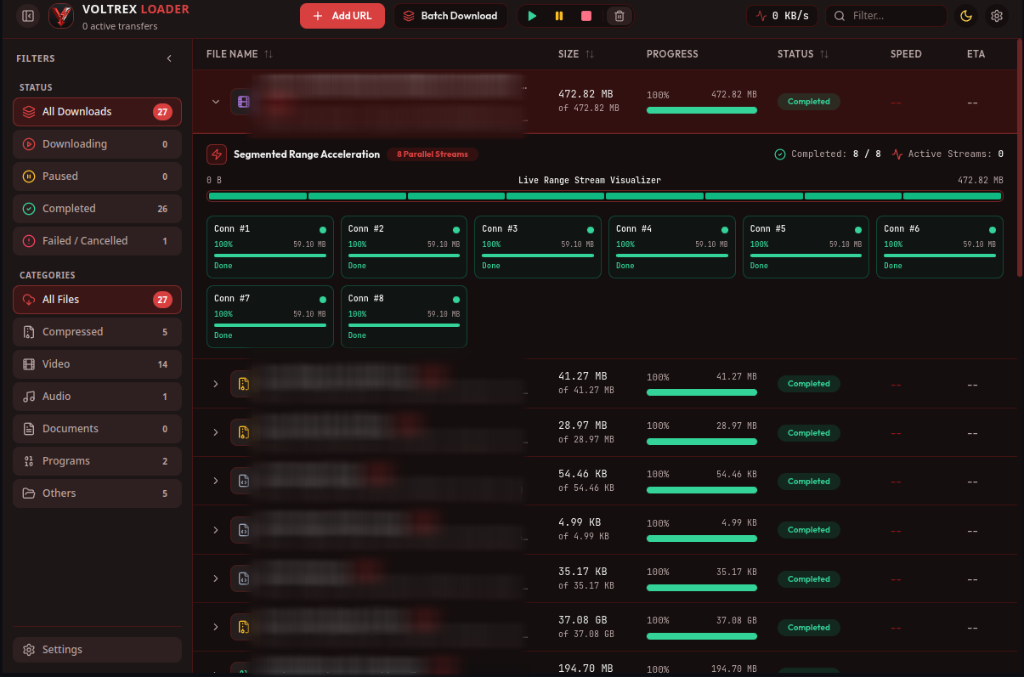
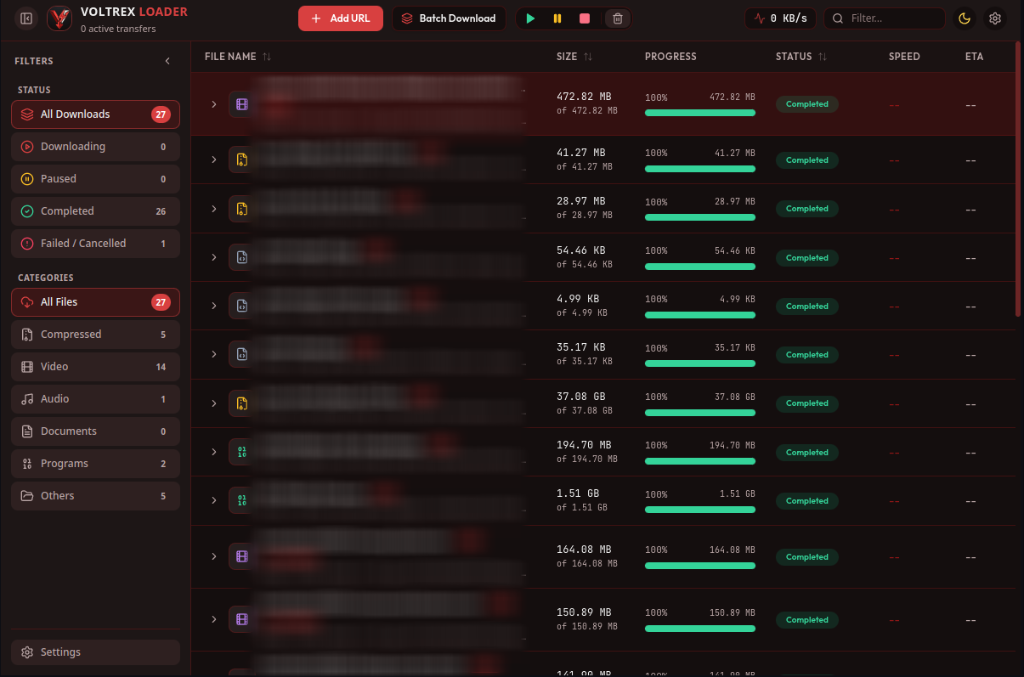
01 Dashboard & Telemetry

Real-time global bandwidth speedometer, active task counts, category sorting, and priority task scheduling.

02 32-Stream Chunk Matrix

Live visualization of 2 to 32 parallel range sockets writing concurrently to pre-allocated disk sectors.

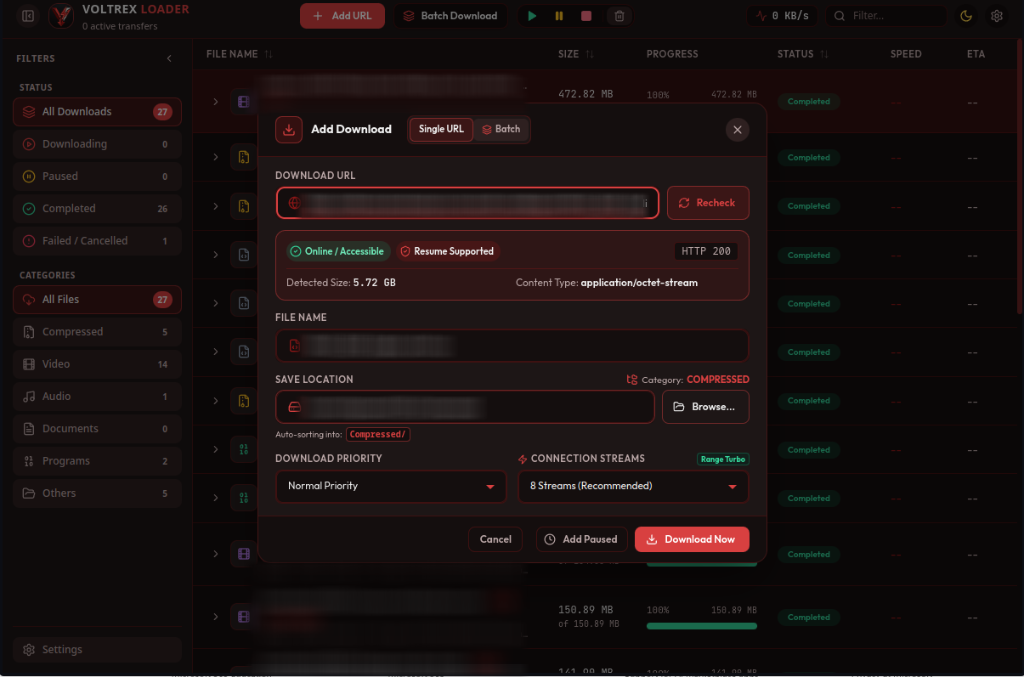
03 URL Probing & Setup

Pre-download HTTP HEAD analysis verifying byte range support, MIME types, and Content-Length.

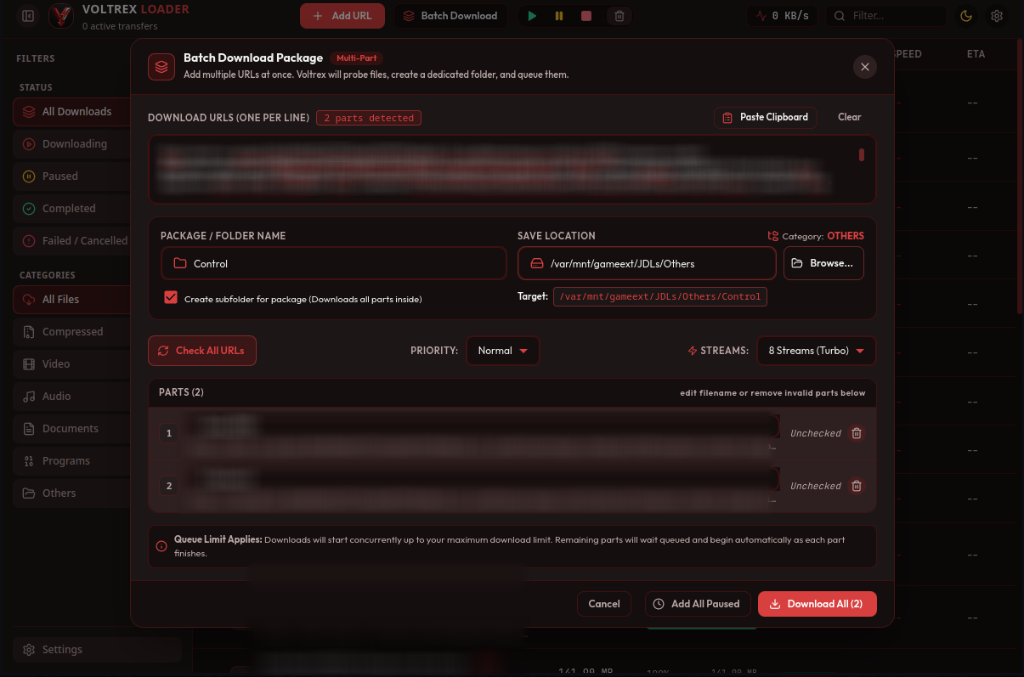
04 Batch Queue & Sniffer

Download sequenced files with wildcard expressions ([01-100]), clipboard parsing, and parallel queue scheduling.

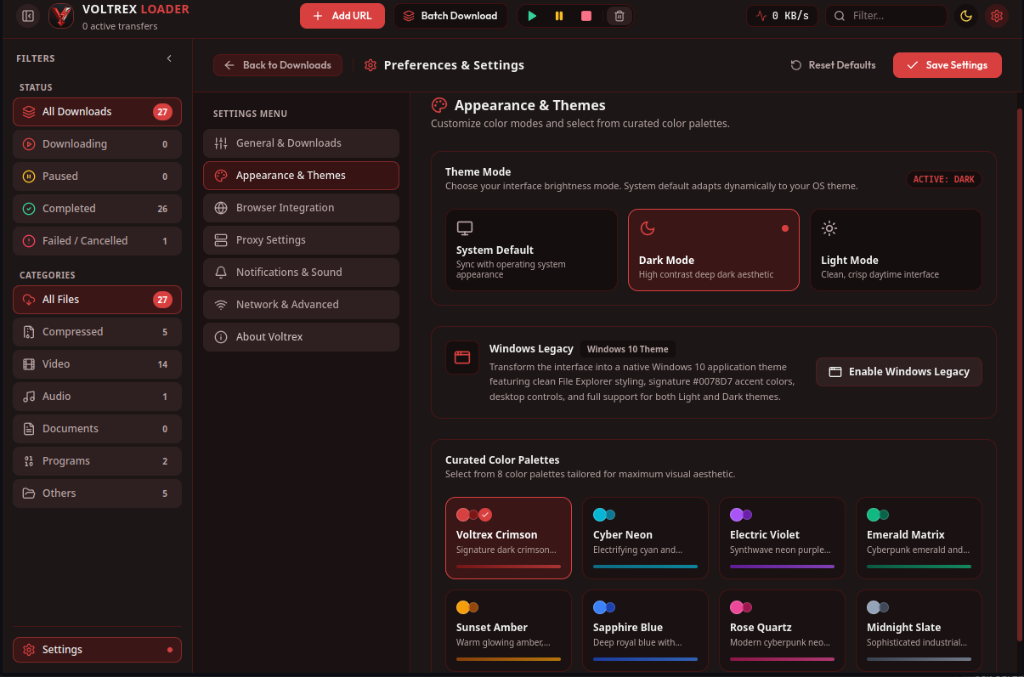
05 Settings & Windows 10 Theme

Signature Windows 10 blue (Light & Dark), SteamOS mode, and customizable concurrency limits.

Scroll Progress Step 1 of 5
Voltrex Loader — Dashboard & Telemetry
01 / 05
Dashboard Screenshot
Chunk Matrix Screenshot
URL Probing Screenshot
Batch Queue Screenshot
Settings Screenshot

Why Multi-Stream Range Streaming Destroys Browser Downloads

Standard web browsers download files through a single TCP socket. If the server or routing node throttles that connection or drops packets, your entire download stalls or fails completely.

  • Up to 32 Concurrent Sockets Voltrex splits files into mathematical byte ranges using Range: bytes=start-end headers and requests them simultaneously, saturating your full network capacity.
  • Zero-Thrash In-Place Disk Assembly Streams write directly into their designated byte offsets inside a pre-allocated sparse file, avoiding unnecessary memory buffers and disk thrashing.
  • Broken Connection Recovery If your network flickers or the server resets, completed segments remain intact on disk. Only unfinished byte intervals are re-requested.
Select File Size to Compare: 25 GB
Voltrex Loader (32 Parallel Streams) 7m 7s
Standard Browser (Single Connection) 59m 16s
* Based on standard multi-chunk TCP windowing benchmark.

Built for Power Users & Gamers

Packed with essential features inspired by IDM and FDM, rebuilt from scratch with modern web standards, zero advertisements, and complete privacy.

Multi-Segment Acceleration

Splits incoming files into 2 to 32 concurrent HTTP Range byte streams writing in-place to disk, saturating high-bandwidth connections.

2 to 32 Threads Sparse Writing

BitTorrent & Magnet Swarms

Integrated high-speed P2P torrent client. Download .torrent files and magnet URIs directly with DHT, peer discovery, live piece tracking, and instant browser interception.

Magnet & .torrent Live Peer Swarm

Real-time URL Probing

Inspects remote host capability before initiating. Extracts Content-Disposition filenames, exact byte lengths, MIME types, and Range support.

Accept-Ranges: bytes Metadata Preview

Category Auto-Sorting

Automatically routes incoming files into designated folders: Videos, Audio, Compressed, Documents, Programs, or custom user targets.

Smart Routing Folder Locking

SteamOS & Deck Ready

Tailored for Linux gaming handhelds and desktops. Complete with automated desktop launcher scripts, AppImage support, and terminal symlinks.

SteamOS Mode Desktop Integration

Batch Capture & Regex

Queue bulk downloads with wildcards, clipboard URL scanning, and automatic deduplication with priority-weighted execution.

Batch Queue Clipboard Sniffer

Catch Every Download Directly from Your Browser

Equipped with a dedicated Manifest V3 browser extension. Click any file link, magnet link, or right-click any video, stream, or archive to send it straight to Voltrex Loader with zero latency over a lightweight local bridge server (http://127.0.0.1:9580).

Microsoft Edge Store
Google Chrome
Brave Browser
Opera & Vivaldi
Get on Edge Add-ons Store Download ZIP (Chrome / Brave)
Extension Installation
Edge Users: Install in 1 click from the Microsoft Edge Store without developer mode.
1
Extract Extension ZIP (Chrome / Brave)

Unzip voltrex-loader-browser-extension.zip to any permanent folder on your system.

2
Enable Developer Mode

Open chrome://extensions in your Chromium browser and toggle Developer mode in the top-right corner.

3
Click "Load Unpacked"

Select the unzipped folder. That's it! Voltrex Loader will automatically intercept your download clicks.

How Voltrex Compares

See why users are replacing legacy, bloated download managers with Voltrex Loader.

Feature Capability Voltrex Loader Internet Download Mgr (IDM) Free Download Mgr (FDM) Standard Browser
Multi-Segment Range Streaming (2-32 Threads) Up to 32 Streams Up to 32 Streams Supported Single Stream (1x)
Native Linux & SteamOS Desktop Support AppImage & Deck Script Windows Only Linux Available Built-in
100% Free & Open Source (MIT) Free & Open Source $24.95 Paid License Proprietary Source Free
Zero Telemetry, Ads, or Bundled Junk Zero Ads / 100% Clean Registration popups Promoted features Clean
Live Visual Chunk Progress Matrix Real-time 32 Block Grid Segment Bars Progress Bars Basic Bar
Chromium Extension (Zero Native Host Config) Zero Config (Localhost) Requires Registry Host Requires Native Host Built-in
Native BitTorrent & Magnet P2P Engine Built-in Swarm Client Not Supported Supported Not Supported

Get Voltrex Loader v1.3.0

Choose your operating system. Free, secure, portable, and ready to run immediately.

Windows 10 / 11

Portable 64-bit distribution. Extract and run immediately without administrative privileges or registry bloat.

Package: voltrex-loader-1.3.0-win.zip
Compatibility: Windows 10 / 11 (64-bit)
Size: ~115 MB
Download Portable (.ZIP) Extract & launch voltrex-loader.exe

Browser Extension

Manifest V3 extension for Chrome, Brave, and Edge. Intercepts file download clicks and routes them to Voltrex automatically.

Package: voltrex-browser-ext.zip
Manifest: V3 (Chromium)
Size: 24 KB
Get on Edge Add-ons Download ZIP (Chrome / Brave) View setup guide
Quick Terminal Launch (Linux / SteamOS Desktop)
Click button to copy
chmod +x "Voltrex Loader-1.3.0.AppImage" && ./"Voltrex Loader-1.3.0.AppImage"
tar -xzf voltrex-loader-1.3.0-linux.tar.gz && cd voltrex-loader-1.3.0-linux && bash install.sh
What's New in Release v1.3.0
Latest Stable Release
BITTORRENT BitTorrent & Magnet P2P Engine

Download directly from magnet links and .torrent files with full WebTorrent integration, multi-file inspection, live swarm telemetry (peers, download/upload speeds), and piece verification grid.

ACCELERATION Segmented Multi-Connection Engine

Download resumable files up to 10x faster with 2-32 parallel HTTP Range streams written in-place concurrently, complete with live chunk matrix visualizer.

ORGANIZATION Category Auto-Sorting

Automatically sorts incoming downloads into designated subdirectories (Videos, Audio, Documents, Compressed, Programs, Torrents, Others) with folder locking.

Frequently Asked Questions

Everything you need to know about Voltrex Loader, range streaming, and platform compatibility.

Yes! Voltrex Loader is 100% free and open-source under the permissive MIT license. There are zero nag screens, no trial periods, no bundled toolbars, and no telemetry tracking your downloaded files.
When a server supports HTTP Range requests (verified automatically by Voltrex during probing), Voltrex splits the target file into up to 32 separate byte intervals. Each chunk is streamed concurrently over its own socket and written directly to its pre-allocated byte position on disk. This bypasses per-connection server bottlenecks and maximizes your network bandwidth.
Yes. Voltrex preserves written .part chunks and metadata on disk. If the network drops or the computer reboots, clicking Resume will re-probe the server's byte ranges and download only the missing fragments without restarting from scratch.
Switch your Steam Deck to Desktop Mode. Download the standalone Voltrex Loader-1.3.0.AppImage, right click it, select Properties > Permissions, and check "Is Executable", then double-click to run! Alternatively, download voltrex-loader-1.3.0-linux.tar.gz and run bash install.sh to automatically add desktop icons and application launcher entries.
Yes! The extension is built using the standard Chromium Manifest V3 specification and works out of the box in Google Chrome, Brave Browser, Microsoft Edge, Vivaldi, and Opera. For Microsoft Edge users, you can install it in 1-click directly from the official Microsoft Edge Add-ons Store without developer mode!